Quick Picks — Best iPad Pro Cases
Contents
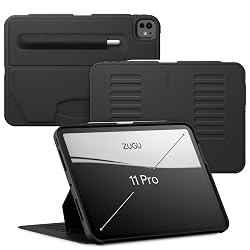
Zugu Case — iPad Pro 11" (M4/M5)
The best all-around iPad Pro case for people who actually use their Pro as a work tool — it stands up anywhere, survives drops, and charges Pencil Pro magnetically.
The Zugu is the case most iPad Pro power users end up with after trying everything else. It combines 10 adjustable stand angles — genuinely useful, from desk work to couch viewing to drawing — with real corner drop protection and a slimmer profile than the OtterBox. The Apple Pencil Pro snaps to the magnetic side rail and stays put. Build quality is high: the polyurethane shell feels premium, and the vegan leather exterior wipes clean. Where the Smart Folio wins on thinness, the Zugu wins on usability. If you got the Pro to do real work, get the Zugu.
Pros
- 10 stand angles — best-in-class flexibility
- Corner drop protection with raised edges
- Apple Pencil Pro magnetic hold on side rail
- Auto sleep/wake via magnetic closure
- Slimmer than OtterBox without sacrificing protection
Cons
- Adds noticeable weight vs. Apple Smart Folio
- No built-in screen protector
- $69.99 is mid-range, not budget
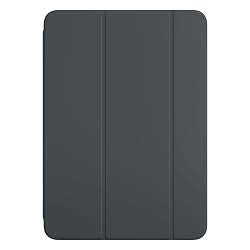
Apple Smart Folio — iPad Pro 11" (M4/M5)
Apple's own case for the thinnest iPad ever made. If you bought the Pro partly for how impossibly thin it is, this is the only case that doesn't ruin that.
The iPad Pro 11" M4 is 0.21 inches thin — the slimmest iPad ever made — and the Smart Folio is the only case Apple designed specifically for it. The polyurethane cover attaches magnetically on both sides, auto sleep/wake is instant, and it folds into two viewing angles for typing and media. No gaps, no misalignment, no bulk. Apple Pencil Pro charges from the magnetic back rail right through the case. Where it falls short: only two stand angles, zero drop protection on corners, and at $79 it's expensive for what you get. But if you move between environments (desk, couch, meetings) and want to keep the Pro looking like a Pro, nothing else comes close.
Pros
- Thinnest case available — doesn't ruin the Pro's form factor
- Perfect fit engineered by Apple for M4/M5
- Instant auto sleep/wake
- Apple Pencil Pro charges through the case
- Available in multiple colors
Cons
- Only two stand angles (typing and media)
- No drop protection — corners fully exposed
- $79 is pricey for a folio-only case
- No Pencil holder — Pencil floats on back
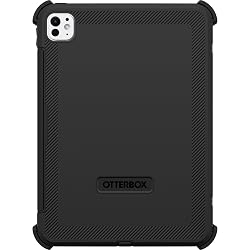
OtterBox Defender — iPad Pro 11" (M4/M5)
MIL-STD-810G tested, built-in screen protector, four stand positions. If the iPad Pro is going to a job site, school bag, or anywhere it might get knocked around, this is what you put on it.
The OtterBox Defender for iPad Pro 11" M4 is the same three-layer, drop-proof system that's made OtterBox famous — inner slipcover, outer shell, and a built-in film screen protector that keeps the OLED display scratch-free. Port covers block dust and debris, and the kickstand locks into four positions. It adds bulk that neither the Smart Folio nor Zugu approach, but that bulk is the point: this case is for parents, contractors, students, and anyone who knows their iPad is going to get dropped. The Apple Pencil Pro tucks into a holder on the back. It doesn't add charging functionality, but it keeps the Pencil secure and accessible.
Pros
- MIL-STD-810G drop tested — genuinely protective
- Built-in screen protector keeps OLED safe
- Port covers block dust and debris
- Four-position kickstand
- Apple Pencil Pro holder on back
Cons
- Heaviest case on this list by far
- Destroys the Pro's slim premium feel
- Built-in screen protector can reduce touch sensitivity
- Only four stand angles vs. 10 on Zugu
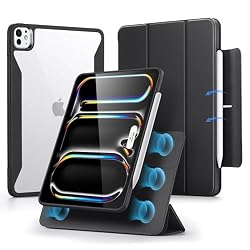
ESR Rebound 360 — iPad Pro 11" (M4/M5)
The best case under $35 for iPad Pro. Removable magnetic front cover, vertical stand mode, Apple Pencil Pro holder — features you'd expect on a $70 case for under half the price.
The ESR Rebound 360 is a genuine value play. The front cover removes magnetically (no tool, no force) so you can use the iPad case-free at a desk and snap the cover back on when you're moving. The vertical stand is legitimately useful for video calls and reading. Auto sleep/wake works reliably. The built-in Apple Pencil Pro holder keeps the stylus secure. Build quality is solid polyurethane — not as premium-feeling as the Zugu, but far better than the price would suggest. The main trade-off versus the Zugu: fewer stand angles and slightly softer corner protection. But for the money, it's remarkable.
Pros
- Removable magnetic cover — use sans-case at a desk
- Vertical stand mode great for video calls
- Apple Pencil Pro holder built in
- Auto sleep/wake via magnetic closure
- Best price-to-feature ratio on this list
Cons
- Fewer stand angles than Zugu
- Not as substantial as Zugu build quality
- Cover can feel slightly loose over time
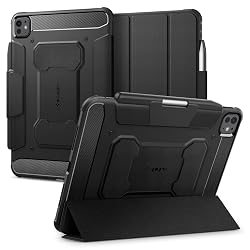
Spigen Rugged Armor Pro — iPad Pro 11" (M4/M5)
If you want real shock absorption without the OtterBox's bulk, the Spigen Rugged Armor Pro threads that needle — Air Cushion Technology corners, Apple Pencil Pro holder, minimal profile.
Spigen's Rugged Armor Pro occupies the gap between the feather-light Smart Folio (no drop protection) and the tank-like OtterBox (too much bulk for most people). The Air Cushion Technology corners absorb impact at the points most likely to hit the ground. The tri-fold design snaps into a typing angle and a media angle with a satisfying click. At around $29.99, it's the most affordable case here that actually protects corners. The Apple Pencil Pro tucks into a holder on the spine. The main limitation is the same as most slim cases: no built-in screen protector and fewer stand angles than the Zugu. But as a daily-carry case that doesn't make the $1,099+ iPad Pro feel cheap, it punches well above its weight.
Pros
- Air Cushion Technology absorbs corner impacts
- Slim tri-fold profile — doesn't add unnecessary bulk
- Apple Pencil Pro holder on spine
- Auto sleep/wake
- Best price for real drop protection (~$29.99)
Cons
- Only two stand angles
- No built-in screen protector
- Carbon fiber texture is subtle — looks plain to some
Full Comparison Table — iPad Pro 11" Cases
| Case | Price | Stand Angles | Drop Protection | Pencil Pro | Screen Protector | Best For |
|---|---|---|---|---|---|---|
| Zugu Case | ~$69.99 | 10 | Corner drop ✓ | Magnetic hold | No | Work / Power users |
| Apple Smart Folio | ~$79 | 2 | None | Back rail charges through | No | Slim / Travel |
| OtterBox Defender | ~$89.95 | 4 | MIL-STD-810G ✓ | Back holder | Yes ✓ | Rugged / Kids / Job sites |
| ESR Rebound 360 | ~$32.99 | Portrait + landscape | Basic | Built-in holder | No | Best value |
| Spigen Rugged Armor Pro | ~$29.99 | 2 | Air Cushion corners | Holder slot | No | Slim protection |
iPad Pro Case Buying Guide
The iPad Pro's special problem: it's too good to ruin
The iPad Pro 11" M4 is 0.21 inches thin — thinner than any iPad before it. The tandem OLED display is stunning. Put the wrong case on it and you've negated half the reasons you paid $1,099+. The best cases for iPad Pro balance protecting that investment without turning a $1,000 slab into a $5 plastic brick.
How many stand angles do you actually need?
If you only ever prop the iPad at a desk for a keyboard or in your lap for media, two angles (the Smart Folio) is enough. If you draw, use the iPad as a second display, take video calls, or work at varied heights, you'll use every one of the Zugu's 10 angles within the first week. The single most underrated feature in an iPad Pro case is angle flexibility.
What about Apple Pencil Pro charging?
The Apple Pencil Pro attaches magnetically to the back top rail of the iPad Pro and charges wirelessly from there. All five cases on this list are cut to allow Pencil Pro magnetic attachment and charging. The Zugu and ESR also have a Pencil holder on the spine to keep it from sliding around in a bag. The Smart Folio does not have a holder — the Pencil is just snapped to the back and held by magnets alone.
11" vs. 13" — which cases work for the larger size?
All five cases reviewed above are for the iPad Pro 11" (M4/M5). Zugu, OtterBox, ESR, and Spigen all make direct 13" equivalents. The Apple Smart Folio also comes in a 13" version. The case choices and trade-offs are identical — just scaled up. If you have the 13", search for each case name + "iPad Pro 13" M4" and you'll find the right variant.
Skip these traps
Avoid generic no-brand cases from Amazon: the M4 iPad Pro has a unique camera module, speaker grill placement, and Smart Connector position — cheap cases often cut out around the wrong spots. Also avoid any case claiming to "fit all iPad Pro 11" models" — the M4 and M5 are slightly different from older generations and cases designed for 3rd/4th gen M2 often fit poorly.
FAQ — iPad Pro Cases
What's the thinnest case for iPad Pro 11" M4?
The Apple Smart Folio is the thinnest case available, designed specifically for the M4/M5. The Spigen Rugged Armor Pro is a close second and actually provides corner drop protection the Smart Folio lacks.
Do iPad Air cases fit iPad Pro 11"?
No. The iPad Pro 11" M4 and iPad Air 11" M2/M3 are similar in size but differ in camera cutouts, speaker placement, and chassis thickness. Do not use an iPad Air case on an iPad Pro — the fit will be off and cutouts won't align.
Does Apple Pencil Pro charge through all these cases?
Yes — all five cases reviewed here allow the Apple Pencil Pro to magnetically attach to the back top rail and charge wirelessly through the case. No case on this list blocks Pencil Pro charging.
Is the iPad Pro M5 the same size as M4?
Yes. Apple did not change the physical dimensions between iPad Pro M4 and M5. Cases listed as compatible with M4 are also compatible with M5 — all five cases on this list explicitly state M4/M5 compatibility.
Which case should I buy if I draw with Apple Pencil Pro?
The Zugu Case. It has the most stand angles of any case here (10), which matters when you're propping the iPad at different heights and angles for drawing. The Apple Pencil Pro snaps to the magnetic side rail and stays in place even when you're moving between angles.