MacBook Pro Battery Dying?
Your 3 Real Options in 2026
DIY if 2020 or newer · Third-party if 2018–2019 · Replace if pre-2018
Apple charges $249 flat. Third-party shops run $80–120. A DIY kit is $40–60 but requires patience and the right tools. The right choice depends almost entirely on your model year and how long you plan to keep it.
Your MacBook Pro is getting through half a day on a charge. Activity Monitor shows battery health below 80%. You're either carrying a charger everywhere or just buying a new Mac. But there's a smarter path — if you know which one applies to you.
The Three Options
Option 1: Apple Service (Official)
Apple's battery service costs $249 for all MacBook Pro models. You get a genuine Apple battery with a 90-day warranty, and your Touch ID, Face ID calibration, and battery cycle data carry over correctly. Mail-in turnaround is 5–7 business days; in-store can be same-day.
Pros
- Genuine Apple battery
- All features preserved
- 90-day warranty
- No risk of data loss
Cons
- $249 flat rate
- May be slower than local shop
- Not worth it on pre-2018 models
Best for: MacBook Pro 2020 or newer where you plan to keep it 2+ more years. At $249 you're buying 500–1000 more charge cycles.
Option 2: Third-Party Repair Shop
A reputable local repair shop or mail-in service (like iFixit's repair service) typically charges $80–120 for MacBook battery replacement. Quality varies significantly by shop. The battery won't be OEM Apple, but good third-party cells from reputable brands (like Ifixit's own) have held up well in our experience.
Pros
- Typically 40–60% cheaper than Apple
- Faster (often same day locally)
- Good option for older models
Cons
- Quality varies by shop
- Non-OEM battery
- Some older MacBooks show "Service Recommended" warning with third-party cells
Best for: MacBook Pro 2018–2019 owners who want a cost-effective repair without doing it themselves.
Option 3: DIY Battery Kit
iFixit sells complete battery replacement kits for most MacBook Pro models. Each kit includes the battery, all necessary tools, and step-by-step instructions. Difficulty varies — most 2016–2019 models are rated "Moderate" because of the adhesive-bonded battery strips. Newer models (M1/M2/M3 era) are actually easier to service.
Pros
- Cheapest option
- Satisfying to do yourself
- Good quality iFixit cells
Cons
- Takes 1–3 hours
- Risk of adhesive damage
- "Service Recommended" warning possible
- Voids remaining warranty
Best for: 2020 and newer MacBook Pro owners comfortable with small electronics, or anyone with an out-of-warranty machine who wants the cheapest path.
Which Option Is Right for Your Model?
| Model Year | Estimated Resale Value | Recommendation | Why |
|---|---|---|---|
| M1 / M2 / M3 (2020–2024) | $700–$1,800+ | DIY or Apple | High value machine worth repairing. DIY is easiest on these models. |
| Intel 2019 | $400–$700 | Third-Party | Good machines worth $80–120 to extend. Apple's $249 is borderline. |
| Intel 2018 | $300–$500 | Third-Party or DIY | Butterfly keyboard era — check if keyboard also needs service first. |
| Intel 2016–2017 | $200–$350 | Consider replacing | $249 Apple repair is often more than the machine is worth used. |
| Pre-2016 | Under $200 | Replace | Not worth any repair cost. The new machine pays for itself in productivity. |
How to Check Your Battery Health First
Before spending anything, check if your battery actually needs replacing. Go to Apple Menu → About This Mac → System Report → Power. Look for:
- Cycle Count: Most MacBook batteries are rated for 1,000 cycles. Above 900 and you're living on borrowed time.
- Condition: "Normal" means fine. "Service Recommended" means replace soon. "Replace Now" means now.
- Maximum Capacity: Below 80% means noticeably reduced battery life.
If your cycle count is under 500 and health is below 80%, you may have a defective battery — Apple may replace it for free under warranty or consumer law depending on your region.
The DIY Toolkit You'll Need
If you're going the DIY route, the right tools make the difference between a smooth repair and a stripped screw. The iFixit Pro Tech Toolkit has everything you need for any MacBook repair, not just batteries.
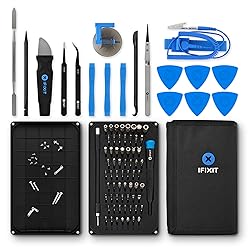
iFixit Pro Tech Toolkit
64 precision bits, spudgers, tweezers, and anti-static mat. Everything needed for MacBook battery replacement and most Apple repairs.
View on Amazon →Frequently Asked Questions
How do I check my MacBook battery health?
Hold Option and click the battery icon in the menu bar — it shows "Normal," "Service Recommended," or "Replace Now." For more detail: Apple menu → About This Mac → System Report → Power. Look for "Cycle Count" and "Condition." Apple recommends replacing the battery after 1,000 cycles or when capacity drops below 80%.
How much does it cost to replace a MacBook battery at Apple?
Apple charges $129–$249 depending on model — MacBook Air is typically $129, MacBook Pro 13" is $129, and MacBook Pro 14"/16" is $199–$249. With AppleCare+, battery service is free if capacity is below 80%. Without it, out-of-warranty pricing applies.
How long does a MacBook battery replacement take at Apple?
In-store Genius Bar repairs typically take 3–5 business days since the battery must be ordered. Some Apple Stores can do same-day if parts are in stock. Mail-in service takes 5–7 business days. Third-party shops are usually same-day or next-day.
Does a third-party MacBook battery replacement void my warranty?
If your Mac is still under Apple's 1-year warranty or AppleCare+, a third-party repair voids coverage for future battery claims. For out-of-warranty Macs, third-party repairs are a legitimate option — shops like iFixit or local Apple Authorized Service Providers use quality replacement cells.
Is it worth replacing the battery on an older MacBook?
Generally yes, if the Mac is otherwise healthy. A $129 battery replacement on a MacBook Pro M1 extends its useful life by 3–4 more years easily. The exception: if the Mac is running an outdated macOS version, has other hardware issues, or the battery replacement cost exceeds 40% of its current used value.
Bottom Line
A dead battery doesn't mean a dead Mac. On any MacBook Pro from 2018 or newer, a battery replacement buys you 2–4 more years of productive use for a fraction of a new machine's cost. The math strongly favors repair over replacement — as long as the rest of the machine is sound.
The one scenario where we'd say skip it: if your MacBook has a failing keyboard (butterfly era 2016–2018), degraded display, or other issues alongside the battery. At that point you're stacking repairs on an aging machine, and the calculus shifts toward upgrading.
More repair guides: MacBook Keyboard Fix · iPhone Screen Repair
← Back to Repair & Restore Hub